From Monolithic to Cloud-Native: Oracle Documaker vs Perfect Doc Studio for CCM
Why Legacy-Heavy Insurers Can’t Ignore Intelligent Document Operations Anymore
The Insurance industry has been revolving around insurtech and its advancements in underwriting or usage-based pricing models. However, there has been a silent emergence in a consequential area: document operations.
Document operations isn’t just about transforming paper-based documents. It has evolved to reimagine how insurers create, personalize, deliver, and manage the millions of documents that establish and define customer relationships. From simple documents like quotes, all the way to the final claim settlement. The future, of course, belongs to those who will join this transformation. Those who don’t will be left behind by their AI-native competitors who deliver better CX at a fraction of the cost.
Key Takeaways:
● Oracle Documaker continues to handle stable, on-premises workloads effectively. However, its monolithic architecture, reliance on DAL scripting, and batch processing make even small updates slow, risky, and costly over time.
● In contrast, Perfect Doc Studio adopts a cloud-native, microservices approach with visual template design, API-first integrations, and omnichannel output, allowing for quicker updates and easier collaboration between business and IT teams.
● Over five years, the total cost of ownership for Documaker includes licenses, hardware, upgrades, and specialized staff. It often far exceeds that of a SaaS solution like Perfect Doc Studio, which combines infrastructure, updates, and support into predictable pricing.
● A phased migration (starting with high-volume, frequently changing templates and running both systems side by side)enables organizations to modernize safely without the risks of a big bang switch.
● For organizations with evolving regulatory requirements, omnichannel communication needs, and a cloud-first approach, switching from Documaker to Perfect Doc Studio isn’t just a luxury; it’s a necessity to stay responsive and competitive in today’s CCM landscape.
The Documaker Legacy: Why It Dominated for So Long
Oracle Documaker was the only serious option for enterprises requiring high-volume document generation. Take the insurance industry, it requires millions of policy documents, claim communications, and more. The banking industry? They produce bank statements, loan letters, quotes, and more. Just like that, they had to choose Oracle Documaker because the alternative was building their own solution.
Documaker delivered on its promise: you could define complex document logic, automate batch processing, and scale to massive volumes. The system worked. In many cases, it still does.
But there is a huge difference between “It works today” and “It is optimized for today”.
Documaker was developed in the pre-cloud, on-premise era.
● Document generation happened in batch windows (overnight jobs processing thousands of documents).
● Form updates were rare (not based on market responses).
● IT managed infrastructure centrally (No auto-scaling cloud environments, everything was manual).
● Integration meant custom code and ETL pipelines (not APIs and webhooks).
● Security was just firewalls and VPN (not zero-trust architecture).
These constraints were obvious because it was 1995, but in today’s market, Documaker has become a system where even the smallest change requires manpower and is risky.
Considering a different CCM platform like Quadient or OpenText? Explore our in-depth comparison to see other document generation platforms you might be evaluating.
Feature Comparison: What Actually Matters
Below is how the two platforms compare on the capabilities that impact real-world operations:
| Capability | Oracle Documaker | Perfect Doc Studio |
|---|---|---|
| Form Design | Binary FAP file format; specialized tool required; steep learning curve | Visual, drag-and-drop interface; native to browser; low learning curve |
| Template Updates | Requires IT ticket; 6-month backlog typical; risk of breaking dependencies | Business users can update; minutes to deploy; no risk of system-wide failure |
| Conditional Logic | Custom DAL scripting; cryptic error messages; expert knowledge required | Visual rule builder; instant validation; no coding needed |
| Data Integration | Legacy APIs; custom ETL; monolithic database connections | REST APIs; 100+ pre-built connectors; webhook support |
| Batch Processing | Monolithic GenTrn process; full batch fails on single error; cryptic logs | Modular pipeline; individual document failures don’t stop batch; detailed error logs |
| Error Visibility | Hex dumps and cryptic codes (DM12042 means nothing without documentation) | Readable errors with context: “Data source XYZ: field validation failed” |
| Testing & Debugging | Limited local testing; trial-and-error in production environments | Full sandbox environment; version-controlled templates; easy rollback |
| Multi-Channel Output | PDF/Print primary; email/SMS requires custom development | Native email, SMS, Voice calls, WhatsApp, PDF, cloud storage, Print, Fax; omnichannel out-of-the-box |
| Regulatory Compliance Updates | 30-day deadline = crisis; weeks to months for changes | 30-day deadline = manageable; hours to days for changes |
| Security Model | Firewalls, VPNs, IP whitelisting; perimeter-based | Zero-trust architecture; RBAC; distributed encryption; SSO |
| Scaling | Manual server provisioning; capacity planning required | Automatic; scales with demand; no infrastructure management |
| Maintenance | $1.2M – $2.5M annually in support costs; infrastructure overhead | Transparent, predictable SaaS pricing; zero maintenance overhead |
| Cloud Deployment | On-premises primary; cloud options limited and expensive | Cloud-native from day 1; global CDN; automatic updates |
Where Perfect Doc Studio Matches or Exceeds Documaker
Perfect Doc Studio matches or exceeds Documaker in:
● Batch document generation volume (handles 10M+ documents daily)
● Visual Template builder (drag-and-drop with content blocks like reusable sections, reusable pages, AI Hub, QR codes, barcodes, and more)
● Omnichannel output (email, SMS, PDF, cloud storage, webhooks)
● Conditional logic complexity (visual rule builder handles the same scenarios as DAL)
● Data integration breadth (100+ pre-built connectors vs. custom code)
● Compliance frameworks (GDPR, HIPAA, ISO compliance features built in)
● Multi-language support (100+ languages with automatic localization)
● Template version control and rollback
● Audit trails and regulatory reporting
● Enterprise security (zero-trust, RBAC, encryption, SSO)
Where Documaker remains a consideration:
● Ultra-legacy system integration (some ancient mainframe systems require custom code that Documaker has 30 years of hooks for)
● Specific third-party ecosystem (some niche tools have Documaker plugins, not Perfect Doc Studio connectors yet)
● Existing Documaker expertise (if you have a team deeply invested in DAL, switching has onboarding costs)
These are real, but they’re the exception, not the rule. For the majority of enterprises, Perfect Doc Studio matches or exceeds capability while dramatically simplifying operations.
The Cost Reality: Where Documaker Gets Expensive
Documaker’s true cost isn’t the license fees but the total cost of ownership. There are direct costs, and then there are “hidden costs.”
Direct Costs:
These cover the license fees, which vary annually depending on the volume. Then there’s Hardware and infrastructure because it requires on-premise servers, databases, and storage. Adding maintenance and support costs to upgrades and patches, which are required every 3 to 5 years, the total 5-year cost often reaches around $5+ million, with expenses increasing as systems age.
Indirect Costs:
Labour: There is a requirement for specialized developers who understand DAL, and then the on-premise infrastructure requires DBAs, system administrators, and IT operations staff. The DAL developers are hard to recruit, and everything else is expensive.
Compliance Overhead: Missed deadlines due to the slow pace of regulatory changes. It results in fines, manual workarounds, and overtime.
Knowledge Concentration: Dependence on a few people who understand the black box creates issues during turnover, resignations, and retirements.
Perfect Doc Studio Cost Structure
The SaaS pricing is transparent, user-based, and depends on the volume. Enterprise pricing is customized and includes licensing fees and implementation costs. Pricing varies based on the number of pages or emails.
The infrastructure cost is zero as it is cloud-hosted.
Maintenance and support are included in the price, and updates are frequent and automatic, based on the latest market technologies.
The 5-year total cost is 70% lower than Documaker’s, with predictable expenses that decrease as you optimize usage.
Implementation & Migration: Timeline Expectations
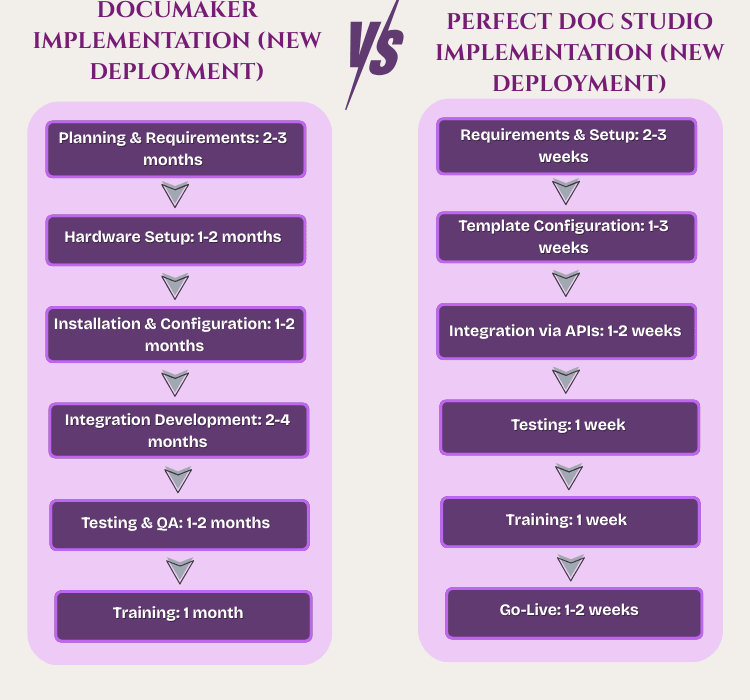
The total time taken for a new deployment of Documaker is 8 to 14 months, and it typically runs over. While Perfect Doc Studio’s total deployment timeline is 4 to 12 weeks but it is cloud-ready from the second week itself.
Migrating From Documaker to Perfect Doc Studio:
It takes 1-2 weeks to audit existing forms. Another 2 to 4 weeks to rebuild high-priority templates (usually 30-50% of forms, covering 80% of volume). The data mapping and integration process takes 2 to 3 weeks. Another 1 to 2 weeks are needed for validation and testing. A parallel run, of course, is optional but takes about 2 to 3 weeks. The total time frame depends on the complexity and parallel-run requirements and is about 8 to 18 weeks.
If you’re still mapping the broader document generation software landscape in 2025, this overview compares Perfect Doc Studio with other leading tools.
The Security & Compliance Angle
For regulated industries, security matters more than novelty. Industries like insurance, banking, healthcare, and security become a top priority.
Documaker’s Security Model:
● Perimeter-based: Firewalls, IP whitelisting, VPNs, on-premises data centers
● Active Directory/LDAP: Through integration for user access
● Encryption: Documaker offers encryption at rest (database-level) and in transit (TLS)
● Audit logs: These are available, but not always exported easily
● Compliance support: It can be configured for HIPAA, GDPR, etc., but requires custom implementation.
The model isn’t weak, but for many enterprises, it works just fine. It assumes a traditional IT infrastructure that most companies do not maintain or prefer.
Perfect Doc Studio’s Security Model:
● Zero-Trust Architecture: The system is built with zero-trust by design where every access is verified.
● Audit Trails: It logs of every action, including who, when, what, where, and why.
● Regulatory Compliance: The system adheres to GDPR, HIPAA, and ISO 27001 compliance, which is built in, not retrofitted.
● Role-Based Access Control (RBAC): The system has fine-grained permissions, with restricted access to teams and members.
● Multi-Environment Deployment: The platform has dev, staging, and production environments with proper gates and a sandbox environment ot test templates safely before going live.
● Single Sign-On (SSO): PDS integrates with the enterprise identity providers for secure and seamless authentication.
Perfect Doc Studio’s security framework makes it easier to prove compliance to auditors or regulators.
If you’re an insurer in the market for a CCM tool, read our guide on CCM tools for insurers!
Case Study
To understand why this matters, consider a real scenario: a state regulator mandates a new dynamic table in all Explanation of Benefits (EOB) documents within 30 days.
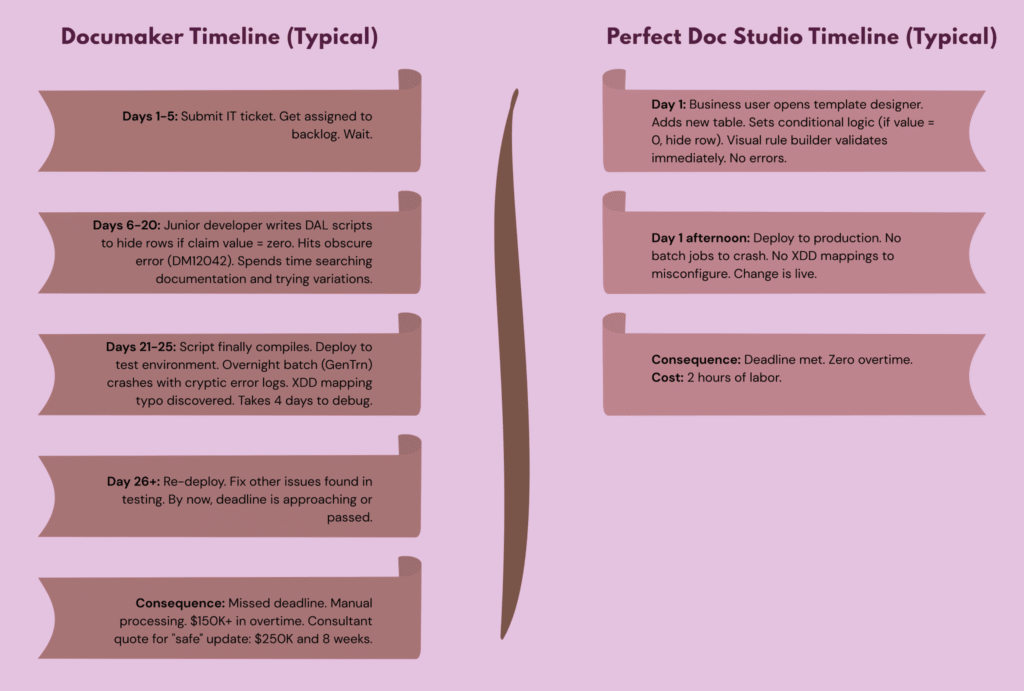
This is the difference between a monolithic architecture, which underpins Oracle Documaker. Then there’s Perfect Doc Studio, which is built on a microservices architecture that enables changes almost immediately. Plus, it is designed to scale horizontally without any additional infrastructure overhead.
If Salesforce is a core system, it’s worth looking at Salesforce document generation best practices to see how a CCM platform should plug into your CRM without custom glue code.
Think of the following as a deciding factor for whether to switch from Oracle Documaker or not
Stay with Documaker if:
➢ You have a small, stable document portfolio (think of it as less than 100 active templates) that rarely requires changes.
➢ Your regulatory requirement is static with no frequent compliance updates.
➢ You have employed deep Documaker expertise and have high staff stability.
➢ The current on-premises infrastructure adequately meets your compliance requirements.
➢ Your organization accepts 6-12 months update cycles for regulatory changes.
Move to Perfect Doc Studio if:
➢ You manage a large template portfolio that requires frequent changes.
➢ Your regulatory environment is dynamic with multiple updates across the year, requiring you to implement changes in days, not months.
➢ You want to reduce labour costs and IT overhead.
➢ You need a faster time-to-market for new document products.
Alternatively, if you’re struggling with making a complete switch, many organizations take a hybrid approach or gradually migrate.
Instead of making a complete switch, you can keep Documaker for stable legacy templates that are low maintenance and migrate high-volume, frequently changing templates to Perfect Doc Studio.
If you opt for gradual migration, you can phase out Documaker over 2-3 years as templates reach natural refresh points. This way, you can use both systems in parallel, with Perfect Doc Studio handling new innovations.
Now you might have some questions if you’re looking at migration.
1. How do we know we won’t break anything?
You migrate in phases, running both systems in parallel. You validate every output. You have instant rollback.
2. What’s the cost to migrate?
Typically, 15-30% of the annual Documaker spend. Payback period: 5-10 months through labor savings.
3. Will our team need retraining?
Yes, but positively. Documaker developers need to learn visual configuration instead of DAL scripting. Operations teams need fewer people. Business users can now update templates without IT.
4. What if something goes wrong?
Worst case: you keep Documaker running and use Perfect Doc Studio for new initiatives. You’ve added capability, not created risk.
5. Who else is doing this?
Hundreds of enterprises. Migration success rate is high (> 90% for planned implementations) when done methodically.
Final Thoughts
Oracle Documaker is not a bad system. It is a legacy system in a digital era. It can still power critical workflows, but will it continue to function in the future? Perfect Doc Studio represents the future. The shift from “monolithic, batch-oriented, on-premises, labor-intensive” to “modular, real-time, cloud-native, efficient.”
The question was never about whether you need to switch to a modern CCM platform, but rather about how quickly you can capitalize on the wave and gain advantages that your competitors are already enjoying. The choice between Documaker and Perfect Doc Studio is about whether you want to be a museum preserving and maintaining a legacy system from 1990s or moving at the speed of today’s business.
Try Perfect Doc Studio today for free with its lifetime freemium account! Sign up now
FAQs
In Documaker, template changes often require editing FAP files, adjusting DAL logic, and updating XDD mappings inside specialized tools, with the risk of breaking batch jobs and little real-time validation.
Perfect Doc Studio lets business and ops teams update templates visually in the browser, reuse content blocks, test changes in a sandbox, and deploy safely in minutes instead of waiting weeks for IT-driven changes.
Yes, Perfect Doc Studio is designed to handle enterprise-scale batch generation and transactional output, integrating with CRMs, core systems, and cloud storage while maintaining performance and reliability at high volumes.
Cloud-native scaling and microservices allow it to grow horizontally with demand, unlike fixed-capacity on-premises deployments where infrastructure must be manually sized and managed.
Documaker primarily integrates via legacy APIs, batch file exchanges, and custom ETL processes, often requiring specialized development and configuration in Documaker Studio and AFGJOB rules.
Perfect Doc Studio exposes REST APIs and provides ready-made connectors and webhooks, making it easier to plug into Salesforce, BPM systems, external storage, and other cloud applications without heavy custom glue code.
Documaker typically relies on perimeter-based security, with firewalls, VPNs, and on-premises access controls, plus database-level encryption and TLS for data in transit.
Perfect Doc Studio implements zero-trust principles, role-based access control, single sign-on, and strong encryption, and aligns with GDPR and ISO-style controls to support regulated industries like banking and insurance.
Complex Documaker environments can take months to replatform, especially when thousands of forms and custom DAL rules are involved.
A focused migration that targets high-impact templates first, combined with visual template rebuilding and API-driven integration in Perfect Doc Studio, can reduce the initial go-live window to weeks rather than a full-year program.

Top PDF Creators
In our increasingly digital and global work environment, high-quality PDF documents have become esse

Find the Perfect Insurance Underwriting Software for Risk Assessment
Insurance underwriting is the cornerstone of any policy. Learn about the latest trends and features

Mobile Email Design Best Practices And Examples
Email is an essential source of communication for businesses. Earlier, emails were an important medi