Choosing Your CCM Platform: Perfect Doc Studio vs Quadient vs SmartComm vs OpenText
A customer communication management platform has grown to become the differentiating factor in the success of a business and the retention of its clients. Selecting the right one is not just about comparing a few features and making a decision based on them. Organizations stepping towards the adoption of a new CCM platform or shifting from an old one to a new one look at solving real business problems. To name a few, legacy systems that consume IT resources, regulatory requirements that create bottlenecks, high-volume document generation that demands precision, and the challenge of deploying changes without waiting for IT teams to do it.
Today, we will be looking at four major platforms to decide which one is the right platform for your needs. There’s Perfect Doc Studio, Quadient Inspire, SmartCOMM, and OpenText Exstream. All four platforms are legitimate players that have taken fundamentally different paths to solving the same problem.
Understanding and recognizing these differences will help you determine which platform aligns with your organizational reality. You need to first analyze your infrastructure, your team’s technical depth, your required regulatory environment, and your growth trajectory for the next 5 to 10 years.
Most comparisons have some bias or take the best-fit-for-everyone approach. Our piece traces how each platform addresses core pain points organizations face, then details where they excel and where you might encounter unexpected friction.
Key Takeaways:
- Choosing the right CCM platform depends on migration speed, compliance strength, and long-term total cost of ownership, not just features.
- Legacy CCM platforms provide scale and governance but often require lengthy implementations and significant IT involvement.
- Cloud-native CCM solutions allow for faster deployment, elastic document generation, and quicker return on investment.
- Business-user adoption is essential—no-code and low-code CCM tools outperform complex systems that require developers.
- Modern CCM platforms combine omnichannel communication, multilingual templates, and analytics in a single system.
If you’re still exploring broader document automation options beyond CCM, this list of the top 10 document generation tools in 2026 gives you a wider market view.
The Real Pain Points: What Decision-Makers Actually Care About
Below, we have compiled a list of reasons for your organization to consider a CCM platform in the first place. These pain points are operational headaches; they negatively impact your revenue, compliance posture, and team productivity.
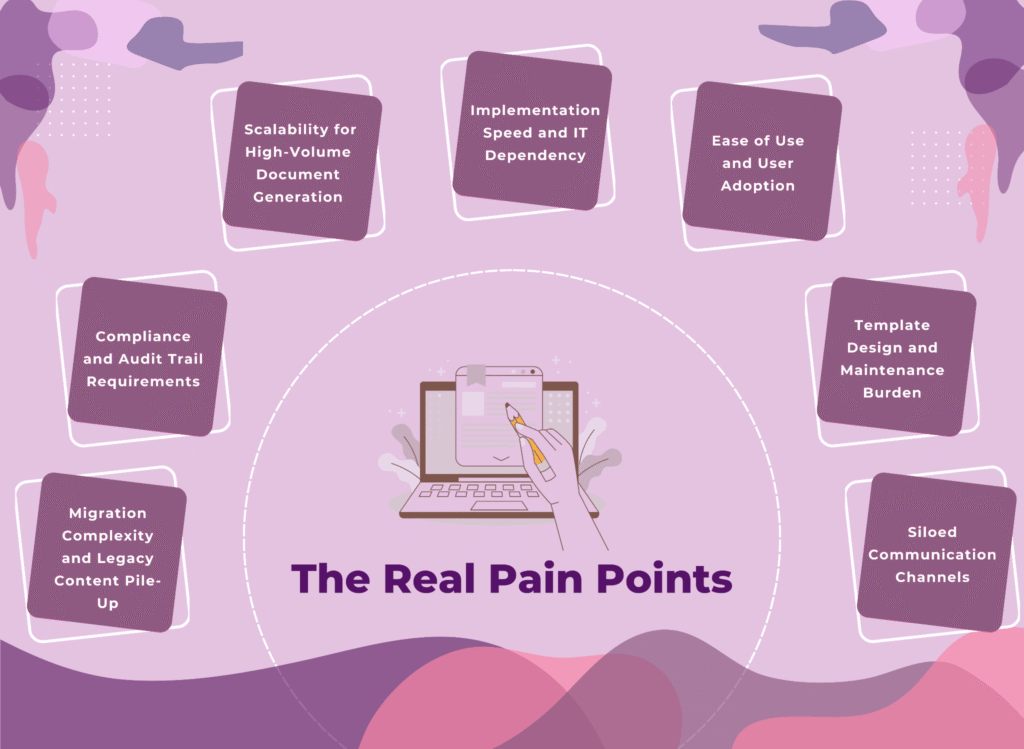
1. Migration Complexity and Legacy Content Pile-Up
Migration, especially for communication assets, is very challenging. Some organizations have to migrate data from multiple legacy systems, not just one. There are thousands of templates, workflows, and data mappings over the years, and if you’re an old organization, even decades.
The goal is to migrate without losing critical logic or introducing errors, which is a high-stakes project.
Migration itself is a reason that many organizations are hesitant to transition. Their migration timeline can be anywhere from 6 to 12 months for mid-market organizations, even with expert support. Multiple communication templates are obsolete, with versions piling up, or duplicates or near duplicates that create an unnecessary maintenance burden.
But what organizations need to understand is that the longer you stick to your legacy system because migration feels like an unbearable risk, you are not only losing your competitive advantage in the market but also putting your employees through another week, month, or year of inflexible manual processes.
2. Compliance and Audit Trail Requirements
The majority of industries in dire need of CCM tools are part of regulatory industries such as banking, insurance, or healthcare. Such industries need to adhere to HIPAA, GDPR, FCA guidelines, and others.
The goal is not just generating compliant documents, but also proving compliance to auditors. There have to be clear answers to compliance questions: What changed in a communication template? Who approved it? When? What version was sent to which customer? All these questions must have an audit trail; a weak audit trail is a regulatory risk.
3. Scalability for High-Volume Document Generation
Different-sized organizations have different document generation needs. Some generate millions of documents annually, while others experience demand spikes: month-end statements and renewal cycles.
The infrastructure needs to scale elastically without overprovisioning. Legacy engines often require teams to procure hardware for peak volumes, and the rest of the time, it is left idle. Cloud-first solutions, on the other hand, offer elastic scaling; the architecture was designed for it from the beginning.
4. Implementation Speed and IT Dependency
The longer an organization uses a legacy system, the more it loses out by not deploying a CCM system. The faster a CCM platform is deployed, the less the organization is dependent on legacy workflows and the sooner it realizes the benefits and value of CCM.
But such benefits also require tradeoffs: some platforms achieve fast time-to-value through configuration and pre-built accelerators, reducing customizations. Other organizations prioritise flexibility, which extends implementation timelines.
There are also questions about IT dependencies. Does the platform require IT involvement for routine template changes, or can business users make adjustments themselves? The goal has always been to empower business users.
5. Ease of Use and User Adoption
Powerful platforms, as powerful as they are, demand steep learning curves. The result? They end up being underutilized as teams revert to workarounds like Word documents, email chains, and local spreadsheets, because the official tool is too complex.
The best technical platform loses value if adoption stalls. It’s a common issue, especially with resistance from teams in larger organizations, when hundreds of people need to create, modify, or manage communications.
6. Template Design and Maintenance Burden
CCM platforms struggle with the complexity of designing, maintaining, and scaling templates. If business users cannot create templates on their own, it becomes the IT team’s responsibility, involving manual coding or scripting. Even a simple change or update creates a delay due to this dependency.
Then comes the bigger problem: designing templates for multiple channels, which have different design requirements but must ensure brand consistency.
The right CCM platform must feature design capabilities that are intuitive and visual, not code-heavy. Aspects like drag-and-drop interfaces, reusable components, conditional logic builders without scripting, and single-template-for-multiple-channels capabilities should be prioritized.
7. Siloed Communication Channels
Many organizations use multiple communication channels. Usually, these communication channels take a siloed CCM approach, which prevents consistent, personalized, and seamless omnichannel experiences. The inconsistent customer experiences lead to missed opportunities and poor customer satisfaction.
An efficient system would be collaborative across departments to create a unified customer journey, which would synchronize messages across all touchpoints.
Before diving into the details, here’s how Perfect Doc Studio, Quadient Inspire, SmartCOMM, and OpenText Exstream compare on the factors that usually decide the deal.
Perfect Doc Studio vs Quadient vs SmartCOMM vs OpenText: At a Glance
Platform Profiles: Where Each Excels
SmartCOMM
SmartCOMM is a cloud-native CCM platform built primarily for large enterprises with mature IT teams and a clear cloud-first strategy. It is widely used in insurance and healthcare.
Deployment: Multi-tenant SaaS with optional hybrid appliance for local processing and data residency; There is no complete on-premise deployment model.
Pricing: Pricing starts around the mid-five-figure range annually, with enterprise deals priced by volume and usage.
Implementation Timeline: 3-6 months for Guidewire customers through pre-built accelerators, but typically around 6 to 12 months for custom implementations.
Where SmartCOMM is strong
● Cloud-native architecture: It is built for the cloud, so customers get elastic scale, automatic upgrades, and reduced infrastructure overhead compared to repackaged on-prem tools.
● High-volume batch output: It is optimized for peaks, scaling when needs rise without permanent hardware investment.
● Single-template strategy: Powerful conditional logic lets teams handle multiple products, regions, and languages [English (Canada, United Kingdom, and United States), French (France and Canada), German, Italian, and Spanish] using a smaller set of master templates, reducing template sprawl.
● Mature Integrations: Prebuilt accelerators for platforms like Guidewire and strong connectors for CRM and core systems help shorten implementation cycles for those ecosystems.
● Compliance focus: The platform embedded many regulatory considerations like GDPR, HIPAA, FCA, and complies with major security/data standards like PCI DSS, SOC 1/2, ISO 27001.
● Version control and collaboration: With strong iteration capabilities, SmartCOMM offers teams version templates, collaboration in real-time, and rollback if needed.
Practical limitations to consider
● Cloud-only commitment: Organizations that require fully on-premise or air gapped environments cannot deploy SmartCOMM. This makes it challenging for heavily regulated organizations. There is Hybrid Cloud that offers some flexibility but not a full on-prem deployment.
● Complexity for business users: The UI and configuration model are very powerful, but at the same time, it means longer onboarding and heavier reliance on IT or specialist builders compared to more business-friendly tools.
● SaaS lock-in: The deep reliance on SmartCOMM’s cloud, roadmap, and upgrade cadence can be a concern for teams seeking greater control over their runtime environment.
● Custom integration effort: While common ecosystems are well covered, highly bespoke or legacy backends may require custom connectors and specialist services.
● Journey Management: SmartCOMM lacks native journey-mapping workflows, which makes personalizing communications challenging.
● Vendor lock-in considerations: A pure cloud architecture means a deeper dependency on the vendor’s infrastructure, upgrade cycles, and roadmap.
Best-fit customer profile
SmartCOMM is most suitable for organizations with over 1000 employees, a budget for enterprise SaaS, and a cloud-first approach. If you are looking to replace a legacy on-premise CCM and want to standardize on a modern cloud-only platform with DevOps-style operations, SmartCOMM can handle heavy workloads and strict regulatory requirements.
To know about insurance-specific CCM, read our in‑depth guide to the top insurance CCM tools in 2026!
OpenText Exstream
OpenText Exstream is a tool that large enterprises value for its high level of regulation and governance, and the need for scaling and deep integration. At the same time, it comes at a steep cost, complexity, and heavy IT dependency.
Deployment: Extreme supports on-premises (perpetual license), cloud (Cloud Edition running in containerized/Kubernetes environments), hybrid, and managed services models.
Pricing: Many large customers tend to negotiate volume discounts, as it is based on a per-user or per-workload basis. There are also licensing costs that are highly customizable by modules, volumes, and deployment models.
Implementation Timeline: A large greenfield project or migration projects take 12 to 24 months, especially in the cases of organizations with legacy systems. Smaller or more focused implementations take about 6 to 12 months through a phased rollout approach.
Where OpenText Exstream is strong
● Regulatory trust and governance: Extreme has highly granular audit trails, object versioning, and approval workflows across templates, rules, and content. It is very suitable for risk-averse enterprises.
● Integration breadth and legacy support: The age-old platform has rich connectors and an API framework that integrates with SAP, core business systems, CRM, content repositories, messaging queues, and custom JAVA/.NET extensions.
● Scalability and batch processing: The composition engine is proven at very high volumes, including hundreds of millions of statements, policies, and notices per year. It excels in batch-processing scenarios where performance, postal optimization, and production control are crucial.
● Flexibility for complex workflows: The platform prioritizes flexibility over simplicity, enabling the design environment and rule engine to support highly customized workflows, business processes, niche regulatory layouts, page, section, and jurisdiction logic.
● Omni‑channel delivery: OpenText Extream supports print, email, HTML, web, mobile, and archive output from shared design, including multi-language and location-specific variants.
Practical limitations to consider
● Steep learning curve and reliance on specialists: The design tools are powerful but very complex, requiring dedicated Exstream developers and administrators. This means there is an increased reliance on IT or external consultants, as business users can rarely manage templates or data changes.
● Infrastructure and operational complexity: The IT dependency is critical even in infrastructure and operations teams to run reliably at scale. With full on-premise or hybrid deployments that involve multiple services, databases, and engines, the cloud edition is also closer to managed enterprise software than just SaaS.
● Slower modernization pace: Because OpenText manages many products, Exstream’s product-led updates in terms of cloud and UX/UI innovation would be far behind pure-cloud CCM competitors.
● Implementation cost and effort: There is an extensive analysis, rule conversion, and performance tuning for implementations or migrations. Obviously, there the ROI will take time, and organizations will pay a higher upfront service cost.
Best-fit customer profile
OpenText Extream is the right strategic fit for large enterprises (5000+ employees) with high document value and complex, regulated communications. If you already rely on OpenText or want deep integrations with other large enterprise platforms, Extream prioritizes legacy or system coexistence over ease-of-use and rapid business self-service.
Only choose OpenText if you can afford a higher total cost of ownership and an IT-centric operating model (software, infrastructure, and services) in return for regulatory assurance, scalability, customization, and long-term platform stability.
Quadient Inspire
Quadient Inspire is an enterprise CCM platform that strikes the right balance between business users and developers, offering power and usability. It provides tools that both groups need to manage complex customer communication.
Deployment: Inspire supports on-premises, hybrid, and cloud deployments, with containerized components that run on Docker and can be hosted on AWS, Azure, GCP, or private cloud infrastructure.
Pricing: Licensing is modular and negotiated based on the components adopted (Designer, Interactive, Scalar, etc.), environments, and volumes. Customers can expect a higher investment than SaaS tools but lower than some large-scale legacy deployments if they limit the scope and services.
Implementation Timeline: Typically, Inspire programs take 6 to 18 months to be implemented based on the number of channels, regions, and systems involved, with focused projects or single-line-of-business rollouts sometimes going live in 3 to 4 months.
Where Quadient Inspire is strong
● Modular, composable architecture: Inspire is built as a suite (Inspire Journey, Inspire Designer & Content Manager, Inspire Flex: Production Server, etc.) so teams can start with core design and production, then add workflow, interactive editing, or data processing as needs grow. This approach also ensures you don’t end up overpaying in the beginning.
● Business-user-friendly template tools: The template design environment has a drag-and-drop layout, reusable components, and a guided rule-builder. Business users can create and manage content blocks, variations, and basic logic.
● Compliance and governance: Inspire includes versioning, approval workflows, and fine-grained locking of regulated clauses or brand-critical content.
● Integration and data handling: It integrates with many systems, and Inspire’s data layer can consume data from many formats, join and transform them visually, and feed them into communications without requiring custom code.
● Omnichannel and interactivity: The system can handle print, email, web, and mobile outputs from a single design source, with real-time preview and interactive editing.
● Ecosystem and enablement: Quadient University, certifications, partner programs, and a global ecosystem offer multiple training options and implementation support.
Practical limitations to consider
● Advanced feature learning curve: Business users can create basic templates, but complex scripting, advanced data flows, and highly tailored workflows require specialized Inspire skills or training.
● Complexity cost: Implementing multi-jurisdictional communications often requires experienced developers or consultants, driving up project budgets and increasing reliance on expert resources.
● Need for experienced implementation partners: Although the product is robust, getting configuration, environments, and governance models right requires Quadient or partner expertise, especially in large global programs.
Best-fit customer profile
Quadient Inspire is a strong fit when you’re a mid-to-large-sized enterprise in a regulated industry like banking, insurance, or utilities. It has flexible deployment options and gives business teams the ability to manage templates and content while also supporting complex, developer-driven scenarios.
Primarily, you need to be prepared to invest in training, expert services, or partners to unlock the full value of a modular, powerful CCM suite.
Perfect Doc Studio
Perfect Doc Studio (PDS) is a CCM platform in a market where most tools were designed over 15 years ago, retrofitted with legacy code. PDS is a tool built with the current cloud architecture, enabling organizations to deliver compliant, personalized communications to customers in days. No six-month implementations, developers needed, or legacy infrastructure overhead.
Deployment
With a cloud-first design (Cloud & Private Cloud), it offers a multi-tenant cloud architecture with no infrastructure burden, maintenance windows, or patching cycles. PDS also provides on-premises and hybrid environments that help meet organizations’ various needs. You can choose either complete control over infrastructure, data, and compliance with your enterprise data center or aim to balance agility, security, and cost by combining cloud and on-premises deployment.
Pricing: Transparency and Accessibility
Perfect Doc Studio’s tier-based pricing is clear, starting from $41/month for SaaS, making enterprise-grade features affordable for small and mid-sized organizations.
For enterprises, Perfect Doc Studio’s pricing is customized based on the number of pages or emails. The enterprise plan offers unlimited users, templates, storage limit, teams, and supports over 100+ languages and 1200+ fonts curated by the PDS team.
Perfect Doc Studio Vs. Competitors
Quadient Inspire: Custom Enterprise licensing (Typically $500K+ annual for mid-market)
OpenText Exstream: Enterprise-only, Negotiated pricing ($1 million +)
SmartCOMM: $35K+ annually
Perfect Doc Studio’s transparent, tiered model means
● No surprise licensing costs: You will know exactly what you’re paying for. PDS’s licensing is the most economical one in the market.
● Pay for what you use: PDS is a pay-per-use solution, plus you don’t have to pay for features you don’t use. That is why the custom pricing for enterprises means you save more.
● Accessible to growing organizations: The platform has enterprise-grade capabilities and features, making it suitable for organizations of all sizes.
● Faster ROI: The lower entry cost means a faster payback period.
Strengths: Where Perfect Doc Studio Actually Wins
1. Ease of Use: The no-code interface is the result of intelligent UI/UX design
Drag-and-Drop Builder: Business users can place text, images, tables, charts, barcodes, QR codes, and dynamic fields using a visual interface with just a few clicks.
Smart Templates: Templates can adapt dynamically to customer data; if a field layout is empty, the layout reflows. Conditional logic occurs in a visual workflow designer.
Reusable Sections: Pre-built, modular content blocks (you can add compliance footer, terms and conditions, product disclaimer, and more). Create once and use it everywhere, highlighting consistency and compliance.
Dynamic Elements: Both static and dynamic charts that pull real data, QR codes that personalize to each recipient, tables that expand and contract based on row count, and images that update based on the context.
Result: Business users can design, manage, and edit their own templates, and compliance teams can review them visually, making the time from concept to live communication drop from weeks to days without any help from IT.
2. Multilingual-First Architecture: Perfect Doc Studio is built with 100+ languages native to the platform.
AI-Assisted Translation with Cultural Content: The platform doesn’t just translate word-for-word, it understands regulatory language, brand tone, cultural nuance and creates copies that resonate in Spanish, French, German, Arabic, Simplified/Traditional Chinese, Japanese, and dozens more.
Single Template, Multiple Languages: A single document template serves 50+ markets, eliminating the need for template sprawl or separate maintenance for each language.
Real-world impact: Companies can reduce their template library size by 60-70% by consolidating multilingual variants into single smart templates. All these multilingual variants are truly personalized, culturally appropriate communications.
3. Truly Omnichannel Delivery: Perfect Doc Studio delivers communication across every customer channel that matters
● Email: Native email generation from documents with responsive design and real-time preview capabilities.
● SMS/WhatsApp: Automatic message length optimization, multi-part handling, and delivery tracking.
● Print: 100% print-ready output, CMYK color management, pre-press validation.
● Fax: Legacy support for regulated industries still using fax.
● Voice Calls: Personalized voice call generation.
● Custom Storage: Store outputs to SFTP, S3, SharePoint, Good Drive, or custom endpoints.
Advantage: The various channels are housed on the same platform and can be derived from a single template as well.
4. AI-Powered Capabilities Built In: Perfect Doc Studio includes an AI Hub with capabilities that competitors either charge extra for or don’t even have.
Design Co-Pilot: The AI suggests template structure, layout patterns, and compliance language based on your description of the communication you need.
Multilingual IQ: Real-time translation with cultural and contextual awareness.
Template Optimizer: Analyzes your templates, suggests compliance improvements, identifies unused sections, and recommends consolidation.
Benefit: Perfect Doc Studio helps teams speed up template creation and suggests improvements, and reduces compliance risks.
5. Batch Processing at Scale Without Infrastructure Headaches: The workflow engine and batch processing handle everything.
● High-Volume Generation: Millions of documents processed in parallel
● Elastics Compute: Scales up for peaks (month-end batch rules), scales down when not needed.
● Job Monitoring and Control: Real-time visibility into batch jobs, pause, resume, and restart capabilities.
● Reliable Delivery: Guaranteed delivery with retry logic and dead-letter queue handling.
Organizations can avoid a complex infrastructure and still run month-end batch cycles of thousands or millions of documents.
6. Migration Engine That Actually Works: Perfect doc Studio’s migration engine isn’t manual template recreation, but intelligent conversion.
It starts with template analysis, analyzing scripts, conditional logic, variables, and more. Then it rebuilds the templates within PDS with pixel-perfect layouts and functional equivalence by using intelligent parsing, automated mapping, and a robust reconstruction engine.
Organizations migrating from legacy systems complete the migration process in 6 to 10 weeks instead of 6+ months.
7. Enterprise-Grade Security and Compliance: Perfect Doc Studio’s comprehensive security and governance framework is built with industry best practices.
Regulatory Compliance: The system adheres to GDPR, HIPAA, and ISO 27001 compliance, which is built in, not retrofitted.
Role-Based Access Control (RBAC): The system has fine-grained permissions, with restricted access to teams and members.
Multi-Environment Deployment: The platform has dev, staging, and production environments with proper gates and a sandbox environment ot test templates safely before going live.
Single Sign-On (SSO): PDS integrates with the enterprise identity providers for secure and seamless authentication.
8. Integration Ecosystem That Grows with You: The system integrates with everything organizations actually use
It integrates with CRM/BPMs (Salesforce, PEGA, Decisions, Pegasystems), ERP and Accounting (SAP, Oracle, NetSuite through APIs), insurance platforms (Guidewire, Duck Creek, Sapiens through API-based integration), business intelligence platforms (Tableau, Power BI and ither communication data feeds), and data sources (SQL Server, PostgreSQL, MongoDB, REST APIs, SOAP services, CSV/Excel uploads).
REST API-first architecture: If the integration isn’t pre-built, you can build it.
9. Communication Analytics That Matter: PDS provides comprehensive insights, not just whether it was delivered or not.
The platform offers delivery tracking, engagement metrics (open rates, click rates, time-to-action for email/SMS), performance dashboards (template performance, delivery success rates, cost per communication), and data export to BI tools for deeper analytics.
If you want to test these capabilities, start a free Perfect Doc Studio sandbox in a few minutes, no credit card required.
Conclusion
Perfect Doc Studio offers a free trial and a lifetime freemium account; there’s no need for a credit card. You can start designing templates and experience what PDS has to offer in hours instead of weeks. The future of modern CCM solutions is where business users self-serve, and that’s exactly what PDS offers.
Don’t spend months in vendor selection; spend a few days testing the product. You’ll see how Perfect Doc Studio reimagines how you create documents, send omnichannel communications to your customers, analyze the communications, and more, all under one platform.
FAQs
A Customer Communication Management (CCM) platform helps organizations design, generate, and deliver personalized, compliant communications across channels like email, SMS, print, and web portals. It centralizes templates, data, and workflows so teams can scale communications without relying on manual processes or scattered tools.
Perfect Doc Studio supports cloud, private cloud, hybrid, and on‑premise deployments, giving flexibility for different compliance and IT strategies. Quadient Inspire and OpenText Exstream also support on‑premise and hybrid models, while SmartCOMM is focused on multi‑tenant SaaS with limited on‑premise options, which matters if you need strict data residency control.
OpenText Exstream is often chosen by very large enterprises with complex legacy estates and strict regulatory requirements because of its deep integrations and granular governance. However, this comes with higher cost, longer implementations, and heavy IT dependency compared to more modern, business‑user‑friendly platforms.
SmartCOMM is a strong fit for enterprises with a clear cloud‑first strategy, especially in insurance and healthcare, offering elastic SaaS scale and integrations with platforms like Guidewire. Organizations that want similar cloud benefits but need more deployment flexibility or a shorter learning curve for business users may prefer a platform like Perfect Doc Studio.
Quadient Inspire provides modular components—such as Designer, Interactive, and production servers—so teams can scale capabilities over time. Its design tools support drag‑and‑drop layouts and rule building for business users, while still allowing developers to handle complex data flows and scripting when required.
Perfect Doc Studio combines a no‑code design studio, omnichannel delivery, and AI‑assisted template management with transparent, usage‑based pricing starting at an accessible SaaS tier. This makes it easier for small and mid‑sized teams to adopt enterprise‑grade CCM without multi‑year projects or specialized developer resources.
Migrations to large legacy platforms like OpenText Exstream or Quadient Inspire often run 6–24 months, especially when thousands of templates and complex rules are involved. Cloud‑first tools with dedicated migration engines, such as Perfect Doc Studio, can shorten this timeline by automating template analysis and reconstruction from existing systems.
Key criteria include migration complexity, compliance and auditability, scalability for peak volumes, ease of use for business teams, and total cost of ownership over 5–10 years. Evaluating how each platform handles these real‑world pain points is more important than checking isolated features on a grid.
Legacy‑heavy platforms like OpenText Exstream typically require specialist developers to manage complex templates and data flows. Tools like Quadient Inspire and Perfect Doc Studio provide more business‑friendly design studios, with Perfect Doc Studio deliberately optimized for no‑code template creation and maintenance.

Localization vs Translation: Which Approach Suits Your Global Strategy?
Image source Imagine launching your brand in Japan, only to discover your catchy tagline translates

Document Generation Challenges
In today’s digital age, there is no shortage of tools available for document generation. Establish
How to Generate Documents with XML Files?
This blog offers a practical guide to generating documents using XML files using various methods. We